


For high school English teacher Casey Cuny, Sundays were rarely a day off.
He’d sit down with a stack of student work — short answers, exit tickets, quizzes — trying to make sense of what students understood and to plan for the week ahead. One of the most time-consuming parts of that process was formative assessment: interpreting student thinking and deciding what to teach next.
In OpenAI’s free Coursera course for teachers, Casey shows how he uses ChatGPT to analyze short-answer responses and plan responsive next steps. He walks through a simple five-step Sunday workflow that turns student responses into concrete Monday plans without sacrificing rigor, professional judgment, or student relationships. The whole process takes about 30 minutes.
As Casey puts it in the course:
As teachers, we all know there’s one thing we never have enough of, which is time.
We also know how important feedback is — actionable, timely feedback.
This workflow doesn’t replace formative assessment. It compresses the time between evidence and response, accelerating learning. And it gives teachers back time to do what technology can’t: build relationships, coach students, and adjust in the moment.

Casey’s Half-Hour Sunday Reset
Step 1: Start with your instructional goal before you turn to ChatGPT
Step 2: Analyze student thinking using a Task–Context–Expectation prompt
Step 3: Iterate to sharpen instructional insight
Step 4: Apply the responsible-use filter
Step 5: Turn insights into Monday’s instruction
Step 1: Start with your instructional goal before you turn to ChatGPT
As we cover in the course, always begin with your goal — not your prompt.
Casey frames his goal this way:
The key to formative assessment is eliciting evidence of student thinking and then responding to that thinking.
Your goal might be:
“I want to understand where students are confused.”
“I need to identify misconceptions.”
“I want to choose the right reteach strategy for Monday.”
Once you’ve defined your goal, then you are ready to turn to ChatGPT.
Step 2: Analyze student thinking using a Task–Context–Expectation prompt
Task–Context–Expectation is the prompting structure taught in the course, and here in Casey’s example, you can see it applied to real student work:
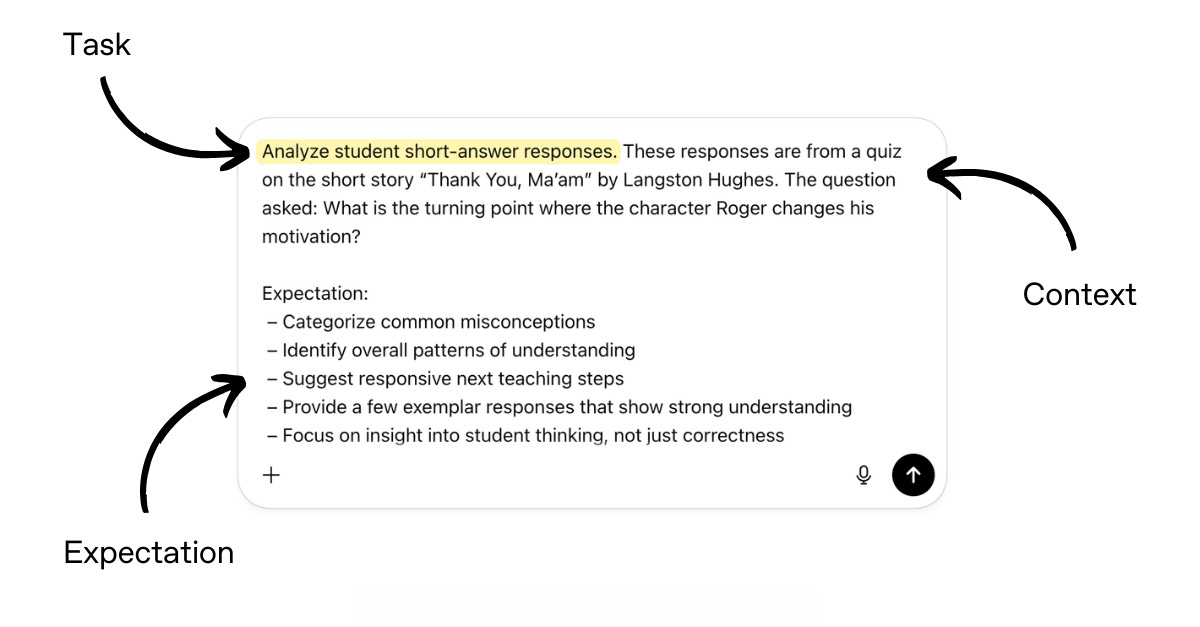
Then Casey pastes in a batch of anonymized student responses. Instead of reading each response in isolation, you’re asking the model to surface instructionally meaningful patterns.
As always, when working with any generative AI tool, remember to follow your district’s AI policy and protect student data.
Step 3: Iterate to sharpen instructional insight
In the course, we emphasize that iterating, rather than accepting the first output, leads to stronger results.
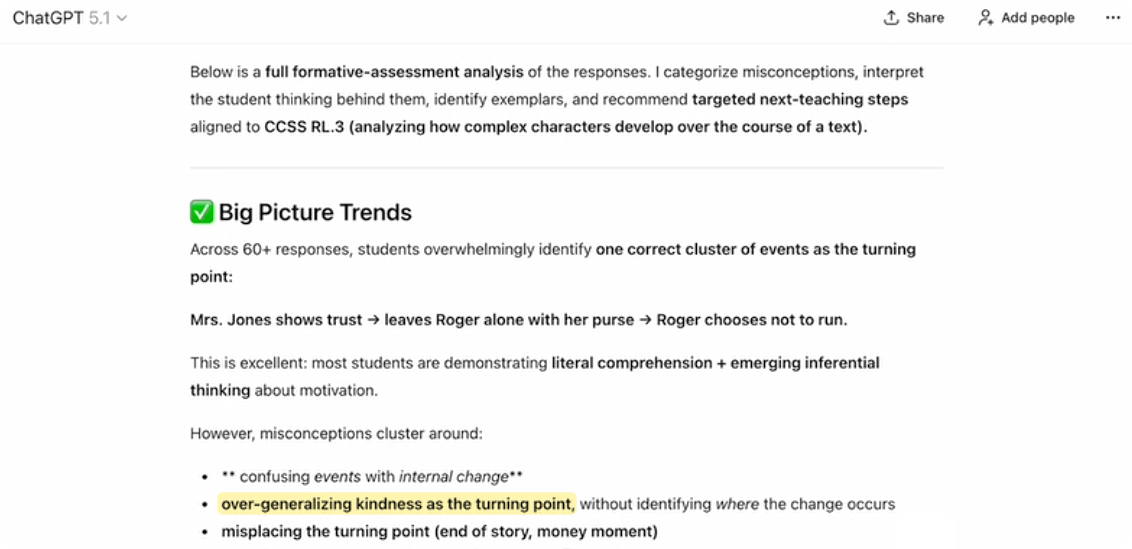
In Casey’s example, the model surfaced patterns such as:
Students overgeneralizing kindness as the turning point
Students misplacing where the actual change in Roger happens
Confusion between cause and effect in the story’s events
At this stage in your workflow, push ChatGPT further: Which misconception is most common? Which is most instructionally urgent? What’s one fast reteach move for each? What would small-group instruction look like?
This is where analysis becomes actionable.
Step 4: Apply the responsible-use filter
AI can help draft — but teachers decide. We call this “teacher in the loop.”
Think of ChatGPT’s responses as a starting point, not a final product. Use your professional judgment to review for accuracy, tone, and instructional fit. Sometimes AI outputs sound confident but aren’t correct. Using your expertise to verify and refine is what turns AI into a reliable teaching partner.
In Casey’s example, when the model identified students as “overgeneralizing kindness as the turning point,” he checked that claim against the responses and the text itself. He used the output to confirm what he was seeing, not to replace his judgment about where students were actually getting stuck.
This is the heart of responsible use: AI helps surface patterns faster, but teachers decide what’s accurate, what matters most instructionally, and how to respond.
Step 5: Turn insights into Monday’s instruction
ChatGPT can help teachers generate instructional outputs in many different formats, and teachers should choose the format that best fits their next step.
What once took Casey two evenings of grading and pattern-spotting became a focused instructional plan in minutes. The insights from his conversation with ChatGPT led him to prioritize a brief whole-class clarification on cause vs. effect in narrative, followed by targeted discussion using exemplar responses. Instead of reteaching the entire story, he focused instruction precisely where student thinking showed the most confusion.
From your analysis, you might:
Plan a 10-minute whole-class clarification
Use exemplars as discussion anchors
Design a new exit ticket targeting the misconception
Dive deeper
See Casey’s full walkthrough of his formative-assessment workflow in our free teacher course. Through step-by-step interactive lessons, you’ll learn how to:
Use Task–Context–Expectation across real classroom tasks
Iterate for instructional precision
Apply responsible use in everyday practice
Use tools such as ImageGen, Canvas, Search, and Projects in your work
If you are a K-12 educator in the U.S., ChatGPT for Teachers is free through June 2027.


I need to have a chat with Olivia
he sitched off his phone on saturday.