

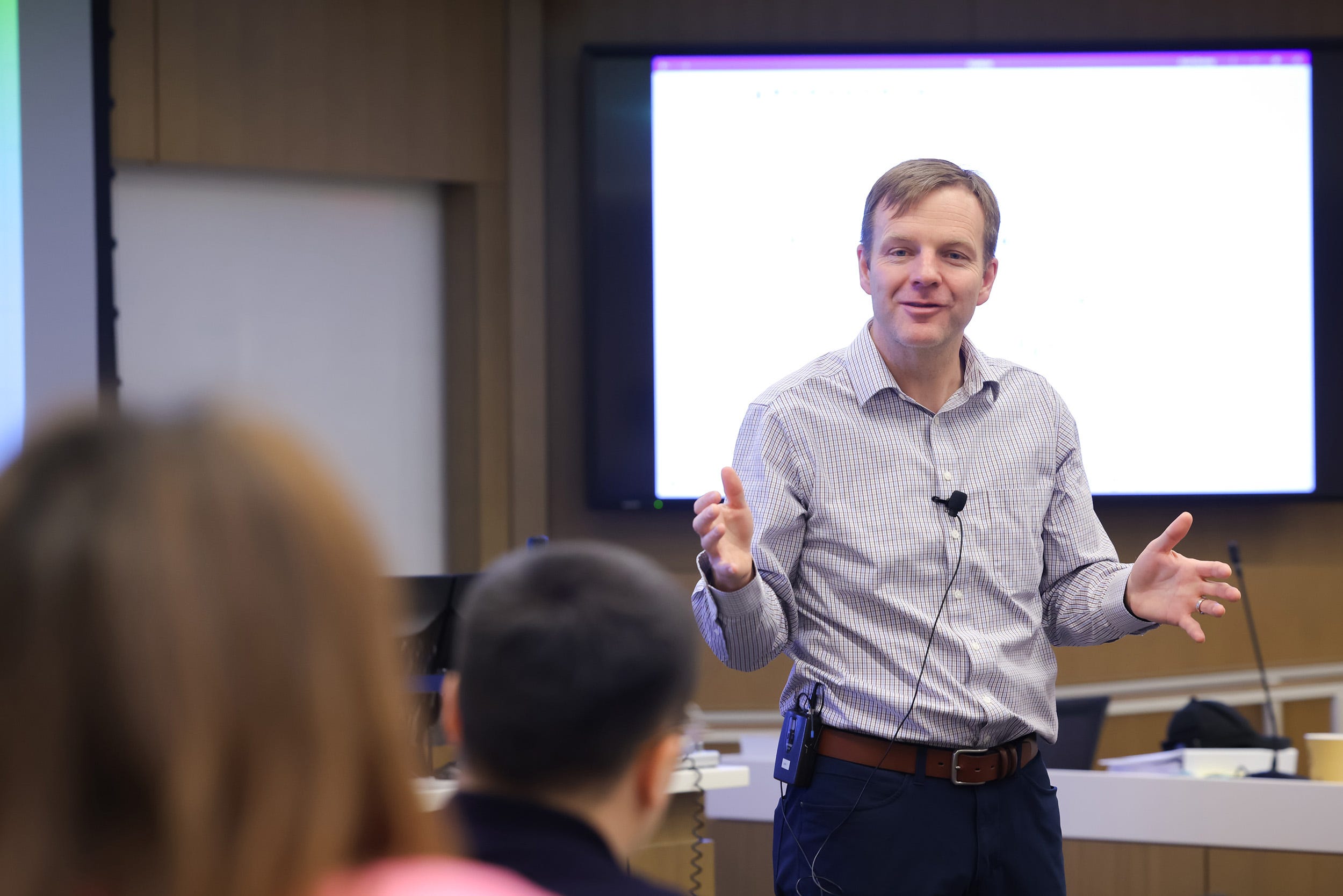
Scott Dyreng is an accounting professor and Senior Associate Dean of Innovation at Duke University’s Fuqua School of Business. Over the past year, he and colleagues at Fuqua have been developing an AI-enabled classroom system with OpenAI’s API designed to help faculty and students better understand participation, teamwork, and the quality of classroom discussion. (Photo by HuthPhoto)
Background
For years, participation has been one of the hardest parts of teaching to evaluate well. Yet learning to show up, contribute, and move a discussion forward is exactly the kind of skill employers prize in business school graduates, and often report seeing in short supply.
The challenge is stubborn. A professor may teach several sections a day, sometimes with 70 students in a room, and then be expected to recall who spoke, what they said, whether each comment advanced the discussion, and how the room responded. Students, meanwhile, often receive a participation grade with little concrete sense of what they could have done differently. Student participation can’t only be a checkbox as their engagement is an important opportunity to develop career readiness. And faculty need to make sure that the current heuristic doesn’t just reward the loudest voice in the room, and students benefit from all contributions, whatever the shape, being considered. But capturing engagement and providing valuable feedback is a near impossible task in a traditional lecture hall.
What if it was possible to design a better way to create better opportunities for teaching and learning using class participation and group work differently?
When Professor Scott Dyreng became Senior Associate Dean of Innovation at Fuqua, he found faculty already trying to solve this problem. He was also wrestling with a related question of his own: if students can now use AI to produce written work in minutes, what remains valuable about coming together in person at all?
His answer was not to use AI to replace the human parts of learning, but to make them more visible: to preserve, rather than automate away, the productive friction of people learning to think together.
Scott talked through the problem with colleagues across the university, and pieces of a solution began to come together. Fuqua’s multimedia and IT teams built on lecture-recording infrastructure they had maintained for decades, adding a way to capture who was speaking and what they said. At a university gathering, Scott described the idea to Robert Olinger, an assistant dean already building an AI system to analyze recorded discussion.
The collaboration brought together classroom capture infrastructure, Olinger’s insight engine, and a shared ambition to make classroom conversation visible. The result was a way to understand who contributed, how teams worked, and where understanding broke down.
It began in one classroom, then two. This fall, Fuqua will open the tool to faculty members who want to use it, starting with first-year team formation and leadership work. The central idea is simple: if leadership education is about learning to think with other people, students need better insight into how they actually interact with them.
The Interview
What problem were you trying to solve when this started?
When I became Senior Associate Dean of Innovation, I started asking people what Fuqua was doing with AI. While some faculty were doing amazing research, and a few were experimenting with AI tools in their teaching efforts, the general consensus among faculty, students, and staff was that we needed to be doing much more.
Around that time, another faculty member came to me with an idea for an AI-enabled classroom. He was trying to automate who was participating and what they were saying. The idea had obvious benefits to long-standing issues in business education.
If we could figure out who was speaking, capture a transcript, and analyze that transcript, we could learn a lot about what was happening in class.
This classroom would solve a longstanding problem with capturing and evaluating participation. In business schools, class participation can be a meaningful part of the grade. But the way we assess it has historically been weak and highly subjective. In the best case, a teaching assistant sits in the room and marks down who said something and maybe whether it was on point. More commonly, the faculty member teaches multiple sections, goes back to the office, and tries to remember who contributed. A week later, that memory is even worse.
Then a student asks, “Why didn’t I get an A?” and the answer is basically, “Your participation was low.” But why was it low? What could they have done differently? That’s not very easy to answer without the details.
Why does participation matter so much in a business school classroom?
Information has been ubiquitously available for decades, and now more accessible than ever with AI. Students still need technical knowledge of course. They need to understand accounting, finance, marketing, operations, strategy, and the rest.
But a big part of business education is teaching students how to interact with people. Students need to learn how to give and receive feedback without coming emotionally unglued. They need to build relationships of trust. They need to persuade people. They need to take the diverse opinions of smart people and find common ground.
That is why participation matters.
It is not just whether someone talked. It is how that participation contributed to learning by building on ideas, challenging others, opening new opportunities, or bringing closure.
How does the classroom system work?
The initial thought was to put a microphone at every desk to capture participation. Our audiovisual team pushed us toward a better approach: ceiling-based microphone arrays. These can capture sound well and determine where the sound is coming from, but preserve the natural feel of the classroom.
We didn’t want assigned seats because that changes the classroom dynamic. So our team modified an app that had been used for attendance. Instead of just checking into the room, students check into a seat. Now we know who is sitting where, we know where the sound is coming from, and we can connect that to the transcript.
Once the transcript is annotated with speakers, we use OpenAI’s API to analyze it with specific context from the faculty lecture. Did a student respond to a question? Did they build on another student’s point? Did someone else build on theirs? Did the comment invite discussion or shut it down? Was it on point, given the material for that class, or was it tangential?
That creates a much more objective and detailed view of classroom participation than the old method that relied primarily on the professor’s memory.
You mentioned allowing students to use AI freely on assignments. What did that look like?
In the fall of 2025, I gave students unfettered access to AI for creating their assignments. In many MBA classes, including mine, students work in teams of about five. They analyze a case, reach a conclusion, write a memo, and submit it as a team assignment.
I discovered that with AI, team culture deteriorated. Many students did not regularly meet with their teams. If there were 10 assignments and five people on the team, they divided them up: you do two, you do two, and so on. While the idea of divide and conquer is not new, unfettered access to AI seemed to exasperate it. Students did not seem as worried about checking each other’s work because AI could help make the final submissions remarkably polished.
But taking divide and conquer to an extreme was exactly the opposite of what we wanted. We were trying to help students learn how to work with others, and introducing access to AI enabled them to reduce their interactions with others.
How did you respond?
Over winter break, I came up with a simple idea: require students to upload an audio recording of their team meeting.
At first, the purpose was simply to make sure students actually met. If they had to submit a recording, they had to get together. But then we realized we could combine transcription and speaker-labeling tools with GPT through OpenAI’s API to analyze the meeting: who participated, how the conversation flowed, and what kinds of interaction took place.
That worked exceptionally well. We could take an hour-long team meeting and learn a lot about how students were thinking, how they were working together, and whether someone was dominating the conversation.
In one real team, there was one male student and four female students. The male student spoke for about 50% of the time. That is exactly the kind of thing a team may not notice clearly in the moment, but it matters.
What kind of feedback did the teams receive?
After each team meeting, we sent the team about three pages of feedback.
Some of it looked like meeting notes. Here’s how much each person spoke. Here were the questions you were supposed to discuss. Here’s what you concluded.
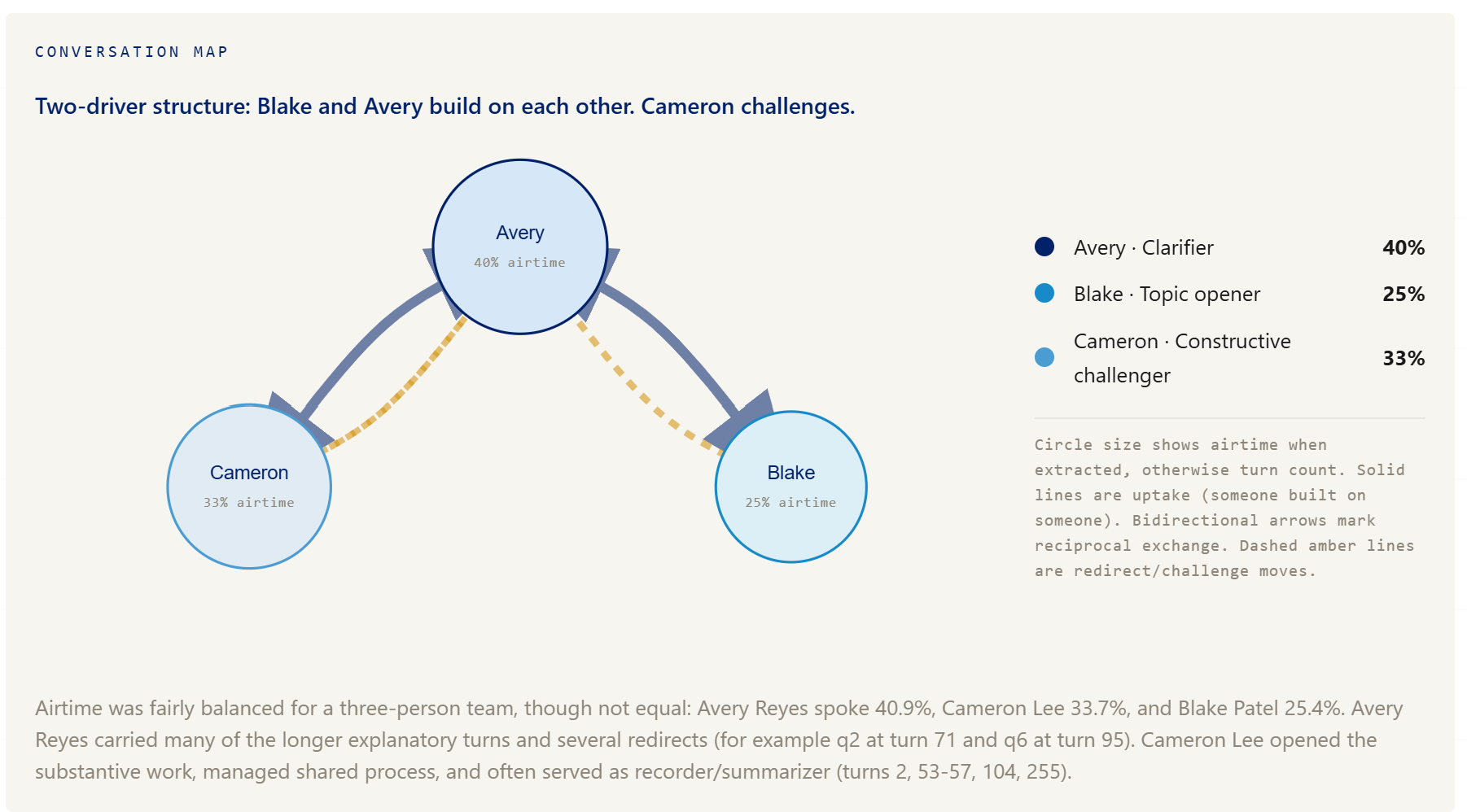
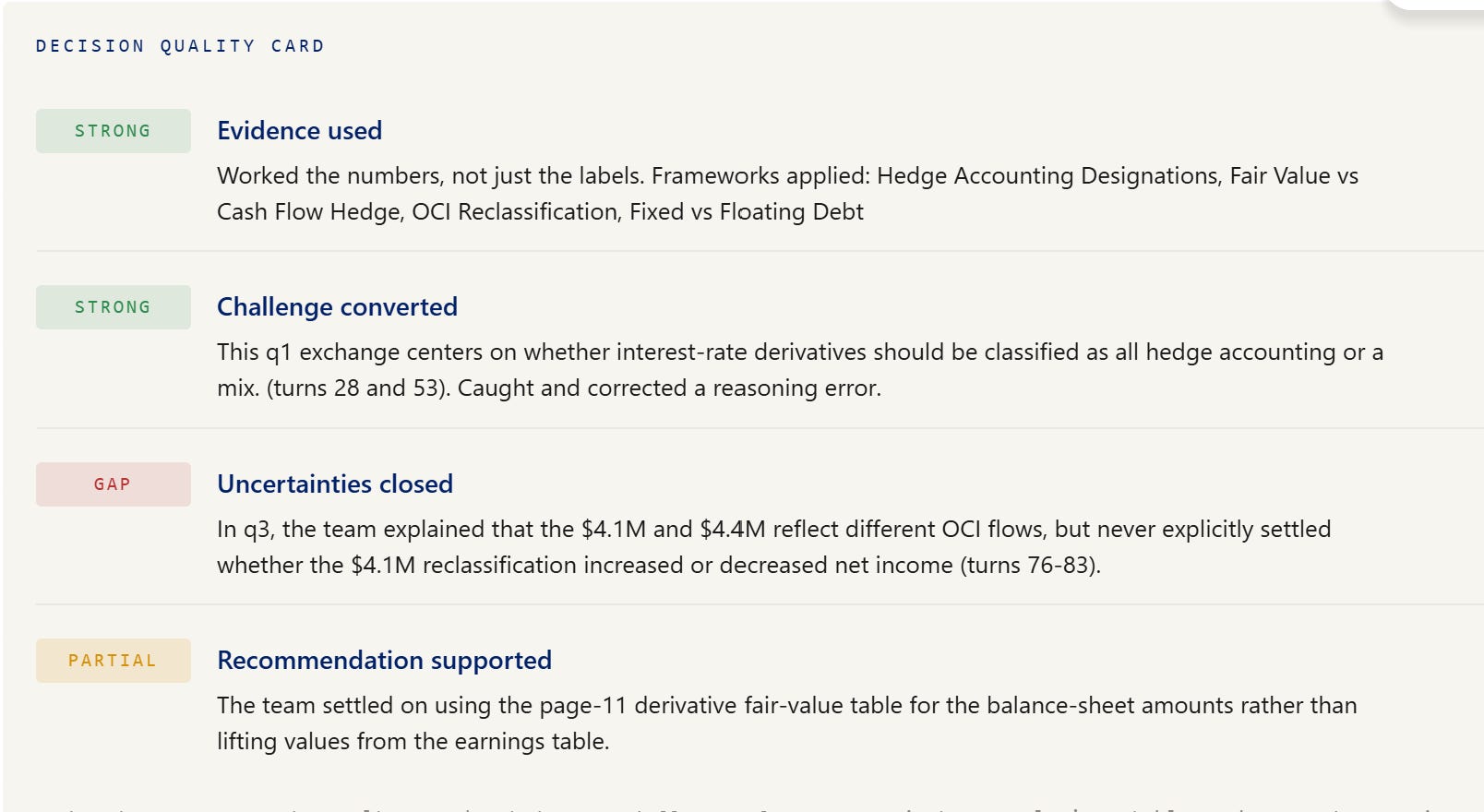
But it went deeper. The feedback analyzed how team members interacted. One person might be good at bringing together diverse perspectives. Another might keep the meeting on track. Another might raise complicated questions that helped the team understand the material more deeply.
It also provided opportunities for students to consider. If Ariel didn’t say much, the team might be encouraged to ask her more questions. If Seth spoke too much, he might be encouraged to ask someone else a question after he contributes.
The point was not to score people. The point was to give them something they could actually change.
What did the system make visible for faculty?
Before class, I received a report based on 15 hours of team meetings from 15 teams.The report described l what concepts students understood, what concepts they were struggling with, and what I might want to emphasize in class.


Some of the insights were general, some were individual. It might say: you should call on Luol because he understood this concept well. You should call on Zion because he understood another concept. Or you should call on team seven because they came up with a point of view that was different from the other teams.
As a faculty member, that type of information is very useful. Before we had this tool, I would read each team’s one-page assignment submissions and try to glean that information. But when you have insights from an hour of discussion from every team, you have far more understanding of what students are actually thinking.
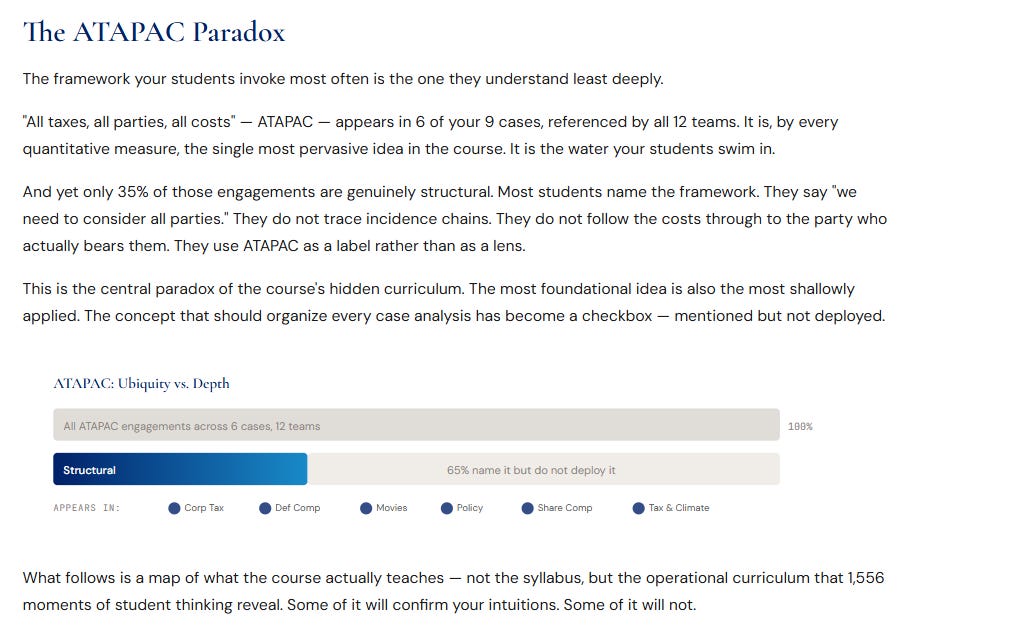
The system also provides feedback to faculty on their teaching by analyzing the whole course. For example, I teach students a specific framework in my class. The AI system showed that students used the vocabulary of the framework, but very few of them actually understood the framework deeply. That tells me I may have been teaching buzzwords rather than real understanding.
I’ve been teaching for nearly 20 years, and I haven’t had access to this kind of insight before.
How do you judge the quality of participation, not just the quantity?
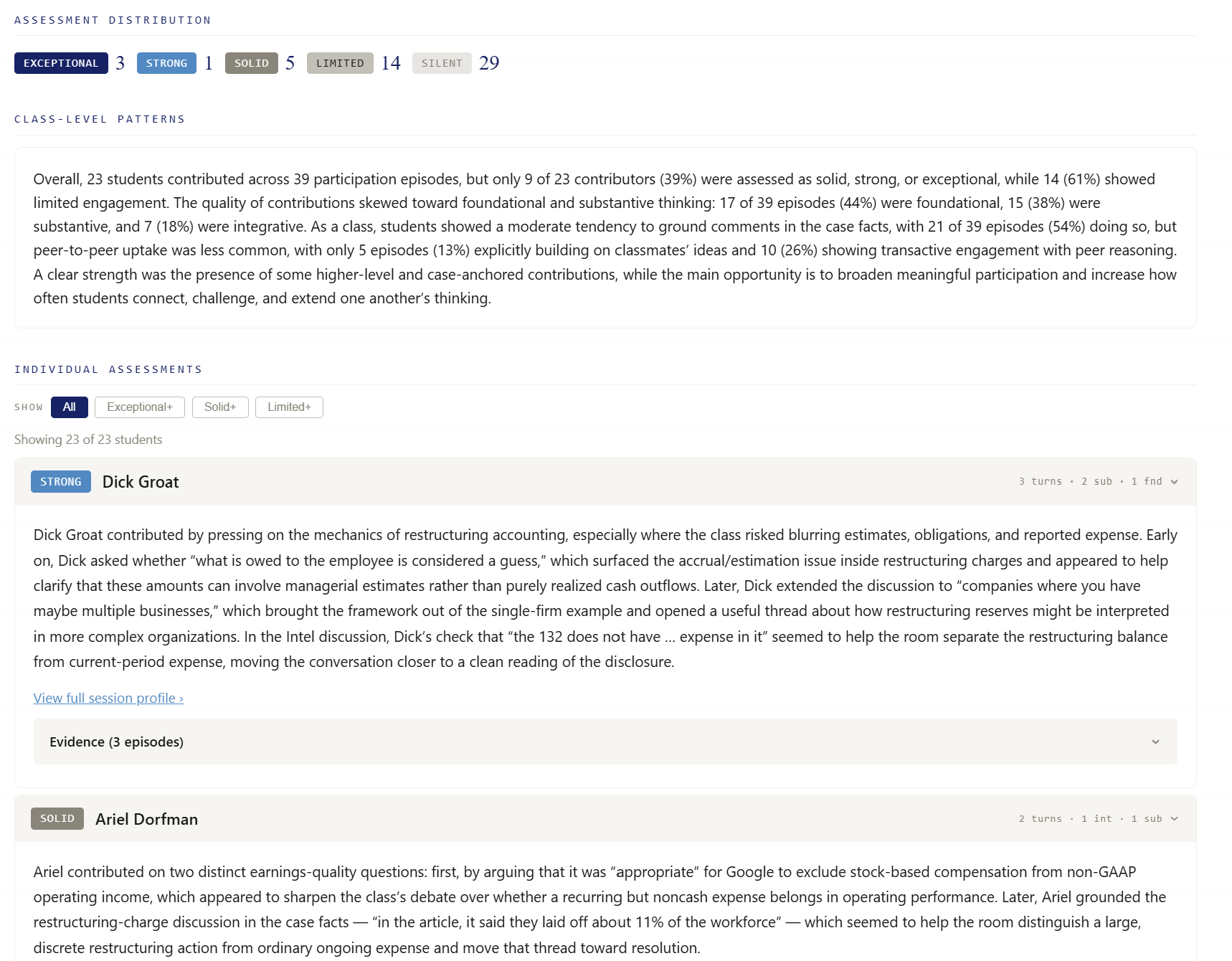
We can create a heat map of participation across the term. Some students speak all the time. Some students never speak.
But the amount of speaking is not the same as the quality of what students have to say. A student might talk often but provide little substance. Another student might speak rarely, but when they do, their comment is highly relevant, integrative, or useful.
The system can help distinguish those patterns. It can describe a student’s role over time: whether they pressure-test logic, bring together ideas, keep the group focused, or stay peripheral. Then students can receive individualized feedback about how their ideas land and what they might experiment with next.
That accumulated feedback matters. A student may not need to hear only, “You spoke too little in this one case.” They may need to see their arc across the term.
How do you manage accuracy, privacy, and fairness?
You have to be careful. We are not simply asking one model to make a judgment and treating that as fact.
The workflow involves many prompts and checks. You don’t just ask one broad question and call it done. You tag the data, analyze it in one context, analyze it again in another context, and sometimes send it through different versions of a prompt to see whether the model agrees before sending feedback to students.
We also ground the analysis in relevant research about team dynamics and in the domain context for the class. If the class session is about taxes and climate, the model needs to know that the meeting is about taxes and climate, and needs the assignment students were working from.
On privacy, the system is designed around anonymized data handling and institutional protections. Transcripts can be anonymized before analysis, then mapped back afterward so the feedback is useful without exposing more identity than necessary.
The aim is not to hand over judgment to AI. The aim is to improve the information available to students and instructors.
How is AI changing assessment?
In my class, students submit team memos. In the past, there was visible variation in writing quality. Now many memos come in polished, because students can use AI to help write them.
That is not automatically bad. In the real world, students will probably use AI to help draft memos. But it changes what faculty need to assess. A polished memo no longer demonstrates that students understand the underlying material.
So we have to ask: What do students actually know? Can they explain it? Can they answer follow-up questions? Can they defend the reasoning behind the work?
That is why oral assessment may become more important. If AI can help assess oral exams at scale, schools may have new ways to test student comprehension..
Where is the work going next?
We began in one classroom. We’ve now raised money to upfit every classroom in the business school, so the tool will be available across Fuqua in the fall for faculty who want to use it.
One early use case is C-Lead, Fuqua’s first-year team orientation program. Students are assigned to teams, create a team charter, and then work together through required courses. We are currently working through the logistics of employing the tool from the beginning so teams can see whether they are following through on the commitments they made to one another.
The same workflow can apply in other settings. For admissions interviews, AI may help assess fit and interpersonal skills more consistently. In career services, mock interviews can be recorded and analyzed so students get better feedback on how they interview.
The transferable piece is the workflow: take an audio file, give it the right context, use structured prompts, analyze against clear standards, and provide feedback people can act on.


What’s the larger story you want people to understand?
The current narrative in education is often that AI is destroying people’s ability to think. What we are doing flips that on its head.
This is about encouraging and developing human interactions with AI instead of having AI take away human interactions. Everything I described is about helping people interact better with humans.
In a business school, students are signing up to become leaders. A leader has to lead people. If someone says, “I do not want you to analyze my team meeting,” we push back and say: you chose to get an MBA. You are here to learn how to work with people.
Every technology can be used well or badly. Our job is to figure out how to use it for good.
What Stands Out
Core idea: OpenAI API is being used to make human interactions more visible, not to replace them.
Classroom design: Audio capture, seat check-ins, transcripts, and structured prompts connect participation to specific moments in discussion.
Student impact: Teams and individuals receive concrete insights on airtime, contribution quality, collaboration patterns, and opportunities to improve.
Faculty impact: Instructors can see misconceptions as well as promising student/team insights before class begins.
Transferable lesson: The same workflow can support classrooms, team rooms, admissions interviews, and career coaching when context and evaluation standards are clearly defined.
Closing
Dyreng’s work points toward a different way to talk about AI in education.
The question is not only whether students can use AI to finish assignments faster. It is whether educators can use AI to see learning that was previously difficult to observe: the half-formed idea in a team meeting, the student who rarely speaks but changes the direction of a discussion, the course concept that sounds familiar but has not actually landed.
For institutions trying to prepare students for work and leadership, that visibility matters. It gives faculty better information. It gives students better feedback. And it reframes AI as a tool for strengthening the human parts of education.
Technical Notes
The system runs on OpenAI’s GPT-5 family at high reasoning effort, using GPT-5.4 as the default analysis model and GPT-5.5 selectively for stages where we’ve validated that it adds value. For each lecture or team meeting, a series of calls maps both the intellectual structure of the discussion and the nature of each participant’s contributions. The participation assessment runs as an ensemble of calls that vote, so the judgment reflects stability rather than a single model pass. This enriched analysis is then fed to a final model that drafts the narratives shown in the screenshots. Because the work scales with the content of the session, a single lecture can consume hundreds of individual model calls. Our analysis models are all from OpenAI, and the system upgrades to newer models as they prove out. We began on GPT-5.2 and now run GPT-5.4 and GPT-5.5.
I love that this makes the invisible part of group work visible.
A polished team submission can hide everything that actually mattered: who challenged the weak idea, who connected two perspectives, who stayed silent, and where the group misunderstood the concept.
The best part is that the feedback isn’t just “you participated less.” It gives students something concrete to try differently next time.
That’s the kind of AI use in education I find exciting—not replacing human interaction, but helping people understand the quality of it.
Some times it is also good that before coding architectures we have intuitive sense of how they work, how underlying mathematics generated and outputs we are getting, and a good way of doing this is to trace algorithms by hands on paper the insights you get are amazing!
I have prepared a 5 article series with workbooks included to do so.
I initial episode trace a full reAct loop by hand, then later moving to parallel processing and soon.
We get to know about archetectural bottlenecks and way to work them.
This is latest episode:
https://ayushmansaini.substack.com/p/the-phantom-convergence-crisis-tracking
And full series:
https://ayushmansaini.substack.com/p/ai-agents-from-first-principles-the?utm_source=share&utm_medium=android&r=4zl69k